
RayCAD vs BIMLOGIQ Smart Annotation: the BIMLOGIQ alternative for MEP tagging
BIMLOGIQ has moved on to its Argus chatbot, and Smart Annotation hasn't been updated since July 2025. RayCAD tags dense MEP sheets neatly, in seconds, on your machine, in Revit 2021 to 2027.



We make RayCAD. Facts about Smart Annotation come from its public pages, listed under Sources.
On this page
- A tool that's still being built
- Neat sheets on dense drawings
- Seconds per view, on your machine
- What BIMLOGIQ Smart Annotation is
- RayCAD vs BIMLOGIQ Smart Annotation at a glance
- What we saw on production drawings
- What to check before you pick a tagging plugin
- Results
- Price, trial and onboarding
- Where RayCAD fits
- Related
- How we wrote this
- Questions
- Sources
Your drafters should be checking MEPF sheets, not building them tag by tag. RayCAD does the tagging for them. BIMLOGIQ Smart Annotation is another Revit plugin that tags for you. We built RayCAD, and in September 2026 we put Smart Annotation through our own production drawings. This page is what we saw.
Start the free 15-day trial · See the comparison
A tool that's still being built
BIMLOGIQ's home page now leads with Argus, its chatbot. Smart Annotation's last update on the Autodesk App Store was on 10 July 2025, and every one of the 60 newest videos on BIMLOGIQ's YouTube channel is about the chatbot. RayCAD is only about tagging. In 15 weeks we've put out 23 releases, every one shaped by what customers asked for.
Neat sheets on dense drawings
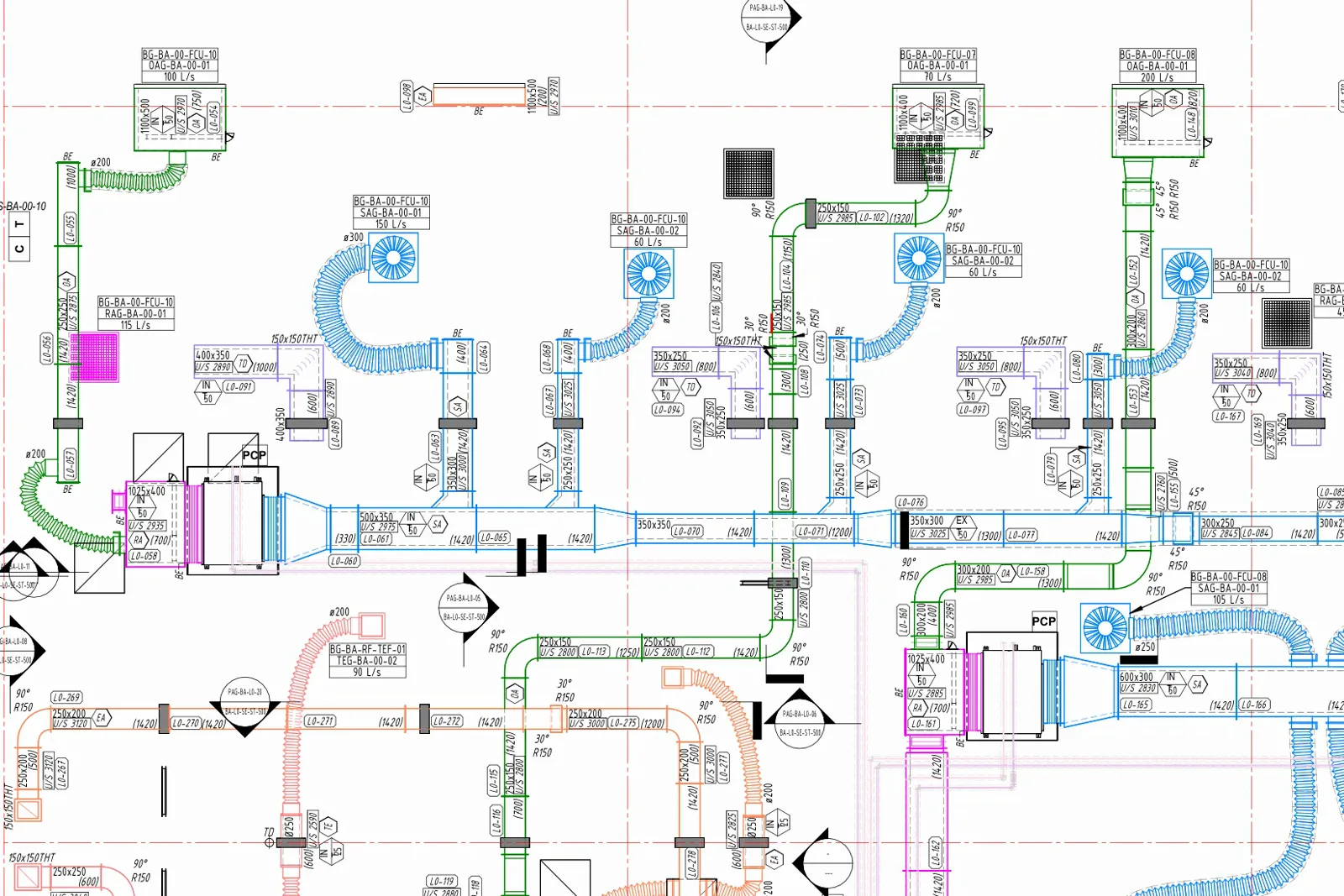
BIMLOGIQ promises "zero overlaps guaranteed". Clearing overlaps is the easy part. RayCAD also keeps every tag tight to its element, puts it inside the duct or pipe when there's room, and adds a leader only where one is needed. Its leaders meet the tag at a right angle, stay clear of other tags and always bend away from the run.
Seconds per view, on your machine
On RayCAD a section takes under 5 seconds, and even the largest floor plan finishes in a minute or two. Our September 2026 runs of Smart Annotation took 15 to 20 minutes for each view. Its tutorial also says your data is "sent to the servers" to complete the job, while RayCAD keeps the whole drawing on your computer.
What BIMLOGIQ Smart Annotation is
Smart Annotation is a Revit plugin from BIMLOGIQ. It places tags from templates that set orientation, filters by length, direction and system, tag grouping and leader types. BIMLOGIQ also sells a Lite version inside its Copilot product, which its own docs recommend for "drawings that are not very busy". The company's home page is now about Argus, an AI chatbot for Revit.
RayCAD vs BIMLOGIQ Smart Annotation at a glance
| RayCAD | BIMLOGIQ Smart Annotation | |
|---|---|---|
| Neatness on a dense sheet | Tags hug their elements and sit inside them where there's room, with short leaders | Tags far from their hosts, long diagonal leaders across ducts (September 2026 run) |
| Overlapping tags | None | None |
| Empty or "?" tags | Caught before placement and shown in the review panel with the reason | Placed, then cleared afterwards with a "Delete Empty Tags" button, which leaves holes |
| Tags where information changes | Each size, elevation or direction change, and along long runs | Every change of a parameter like size or elevation |
| Speed on a production view | A few seconds, and a minute or two for big plans | 15 to 20 minutes a view in our September 2026 run |
| Where placement runs | On your machine | Data "sent to the servers" |
| Revit versions | 2021 to 2027 | 2022 to 2026 |
| Last update | Weekly releases | 10 July 2025 on the Autodesk App Store |
| Price for 10 drafters | $2,400 a year, every user licensed | $22,400 a year at $2,240 per user |
| Free trial | 15 days on your own live projects, free onboarding for your whole team, more time if you need it | 14 days on your own: install, then click "Activate Trial" |
| Onboarding | Free for everyone on the team, starting in the trial | Customised onboarding on the Enterprise plan only |
| Custom changes for your firm | Yes, asked for directly with the founders on WhatsApp or Teams | Not published |
What we saw on production drawings
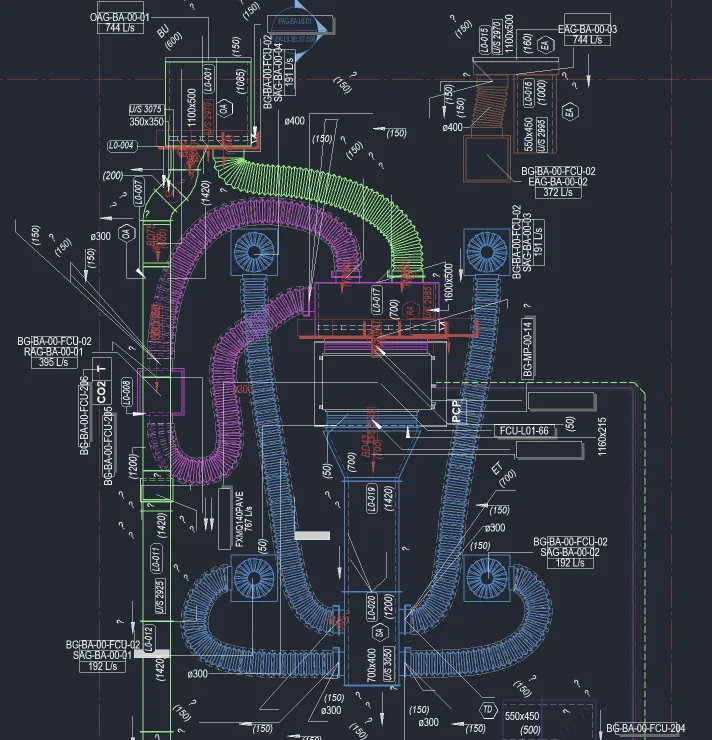
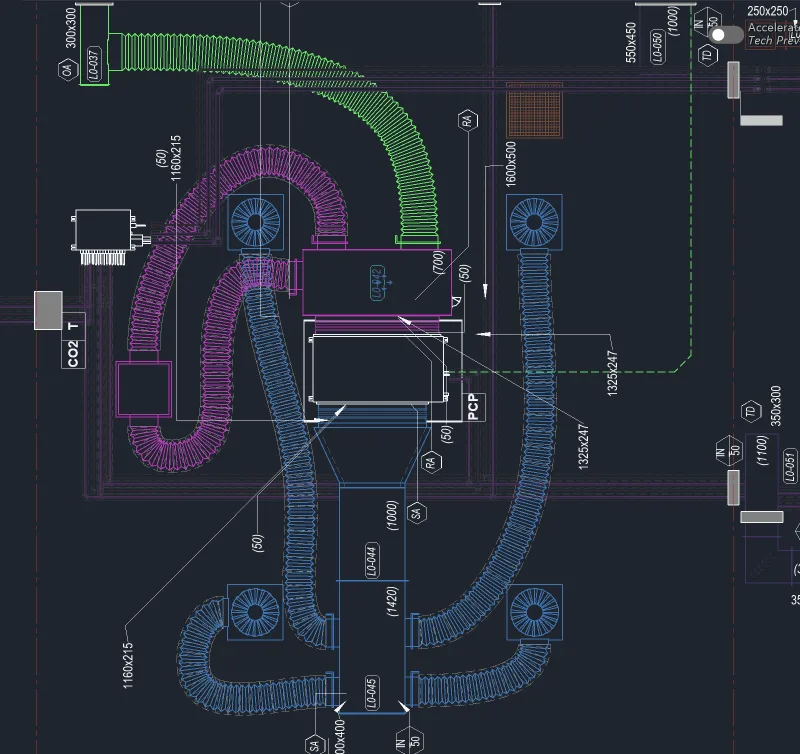
In September 2026 we ran Smart Annotation on a live HVAC floor plan. There were no overlaps. The tags still landed far from their hosts, long diagonal leaders crossed ducts and equipment, the same tag repeated on neighbouring elements, orientation was mixed, and "?" tags were left across the view.
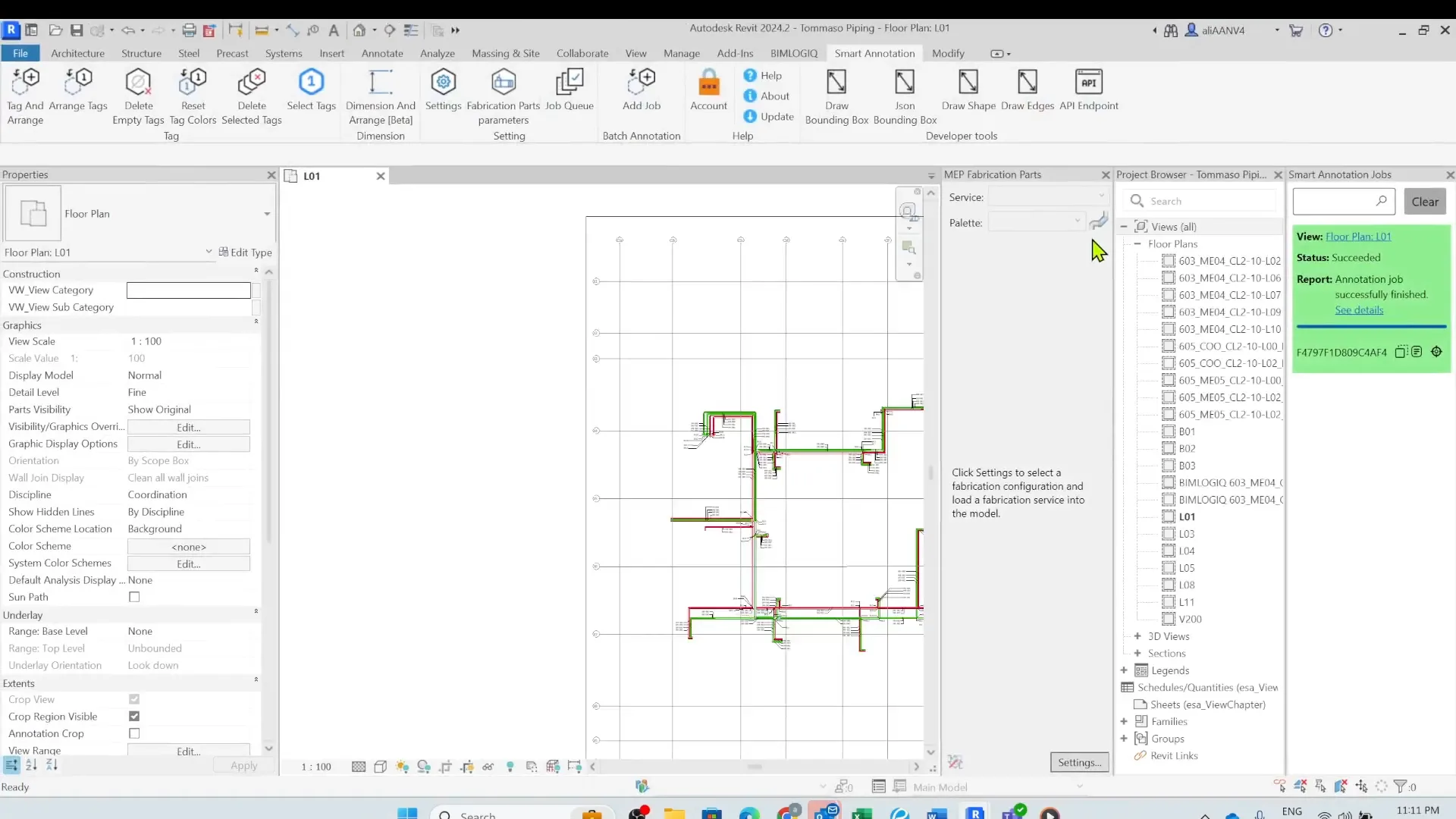
BIMLOGIQ's own introduction video shows a sparse 1:100 piping plan with a few small groups of tags. Shop drawings look nothing like it.
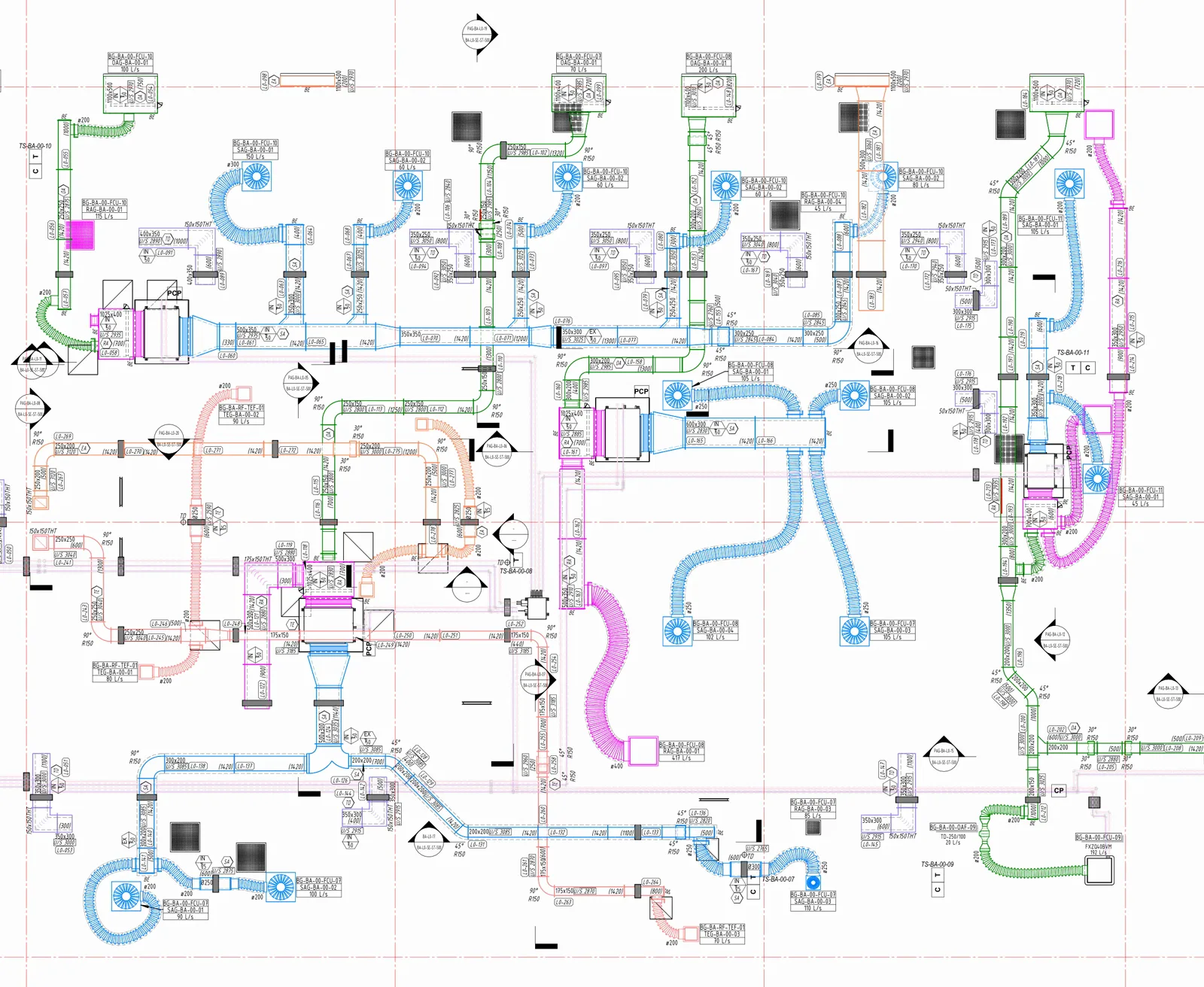
Production sheets are crowded, and one element often carries 5 or 6 tags. RayCAD is built for exactly that. Below is a full HVAC floor RayCAD tagged, followed by a zoomed-in part of it.
What to check before you pick a tagging plugin
What happens to empty and "?" tags? Before RayCAD places a tag, it checks that the tag will show real information. Any tag that would read empty or "?" never reaches the sheet. It waits in the review panel with the reason, and the layout only makes room for good tags. Smart Annotation places them, and BIMLOGIQ gives you a "Delete Empty Tags" button to press afterwards. By then the layout was built around those tags. The tags beside them were already pushed further out to make room, and deleting the bad ones leaves holes where they sat. You end up with tags far from their hosts and gaps across the sheet.
Where does my data go? BIMLOGIQ's tutorial says the collected information "will then be sent to the servers where the AI algorithms will finish the process". Once data leaves your office it can leak, however careful the vendor is. RayCAD does all the placement on your own computer. The only thing we collect is usage telemetry (counts and timings). Our security page lists it, and one setting turns it off. We'll sign an NDA, and you can watch the traffic in Wireshark during a run to confirm it.
Will it run on our Revit version? RayCAD supports Revit 2021 to 2027. The Autodesk App Store lists Smart Annotation for 2022 to 2026, with no update since July 2025.
What if our config isn't perfect yet? Even a rough RayCAD config gives you a sheet that's usable after some tidying. The Smart Annotation run above is what a rough config got us.
Can it match our drafting standard? In RayCAD's config panel you choose where leaders attach, how tags sit inside ducts, each tag's orientation, how often a tag repeats, the shortest run worth tagging, and whether a tag goes before a change, after it or on both sides. Generate Config scans your project and suggests the mappings. Need something the panel doesn't offer? We build it into RayCAD, and you talk to the founders directly on WhatsApp or Microsoft Teams.
Is it stable in Revit? RayCAD runs all day on live projects at the firms that use it. We tracked down and fixed every crash they reported, and crashes are now rare. The details are on stability.
What can it tag? HVAC and piping today, on native elements and fabrication parts. Electrical and fire sprinklers arrive next week. Before any release ships, it runs on live projects at several client firms, so new features already work on real drawings.
Results
The team at Orbit Engineering Services spends around 70% less time on tagging since moving from manual tagging to RayCAD. Read more in faster turnaround.
Price, trial and onboarding
One RayCAD subscription is $200 a month and covers your whole company, as listed on our pricing page. There's a license for every drafter and no cap on usage. Smart Annotation PRO is listed at $2,240 per user per year. A team of 10 drafters pays $22,400 a year for it, and $2,400 a year for RayCAD. Add a drafter and BIMLOGIQ's bill grows by another $2,240. Ours stays the same.
Smart Annotation's trial is 14 days and self-serve: you install it, click "Activate Trial" and work it out alone. Customised onboarding is kept for the Enterprise plan. A RayCAD trial runs for 15 days with nothing held back, and we're with you through it. Your whole team gets onboarded, we configure RayCAD to your standard, and we work through your live sheets together. Need more time to judge it properly? We'll extend it. Price only comes up after you've seen the hours it saves.
Where RayCAD fits
Tagging still eats a large share of MEP drafting time, and fixing it needs a team focused on that problem alone. BIMLOGIQ turned to a chatbot before tagging was solved, so firms that standardised on Smart Annotation are stuck on a release that ends at Revit 2026. RayCAD exists to make manual tagging unnecessary, for every trade and every drafting standard. The changelog shows what we shipped this week.
Run RayCAD on your own live sheets for 15 days. We'll set it up alongside you, and you decide after you've seen what it saves.
Related
- How RayCAD compares with Bimrock Autotag
- How RayCAD compares with Revit Tag All
- Our roundup of Revit tagging plugins
- Intelligent placement
- Data security
How we wrote this
RayCAD is our product. Everything we say about BIMLOGIQ comes from its website, docs, Autodesk App Store listing and YouTube videos, which we checked on 9 November 2026 and list under sources. Screenshots and timings labelled September 2026 are from our own production runs of the Smart Annotation version available then. Spot something out of date? Email founder@raycad.in and we'll correct it.
Frequently asked questions
Is RayCAD a good alternative to BIMLOGIQ Smart Annotation?
Yes. RayCAD tags dense production sheets neatly, never places an empty or ? tag, tags a view in seconds, runs on your machine and supports Revit 2021 to 2027. Smart Annotation hasn't been updated on the Autodesk App Store since July 2025 and doesn't list Revit 2027.
Is BIMLOGIQ still developing Smart Annotation?
BIMLOGIQ's home page now leads with Argus, its AI chatbot. Smart Annotation's last update on the Autodesk App Store was on 10 July 2025, and the 60 newest videos on BIMLOGIQ's YouTube channel are all about its chatbot.
Does BIMLOGIQ Smart Annotation send my data to the cloud?
Yes. BIMLOGIQ's own tutorial says the collected information "will then be sent to the servers where the AI algorithms will finish the process". RayCAD places every tag on your machine and sends only usage telemetry, which you can switch off.
Does Smart Annotation work in Revit 2027?
The Autodesk App Store lists Revit 2022 to 2026. RayCAD supports Revit 2021 to 2027.
What does RayCAD cost?
$200 a month for the whole company, with a license for every user and unlimited usage. Smart Annotation PRO is listed at $2,240 per user per year, so a team of 10 drafters pays $22,400 a year. The same team pays $2,400 a year for RayCAD.
What can RayCAD tag today?
Everything on HVAC and piping sheets, on native elements and fabrication parts. Electrical and fire sprinkler tagging arrives next week, once it has passed testing on client projects.
Is there a free trial of RayCAD?
Yes. You get 15 days with nothing locked and no card needed. We set RayCAD up with your team during those days, and if 15 days isn't enough to judge it, we add more.
Sources
- BIMLOGIQ home page (checked November 9, 2026)
- Smart Annotation product page (checked November 9, 2026)
- Smart Annotation on the Autodesk App Store, with version history and reviews (checked November 9, 2026)
- BIMLOGIQ docs, Smart Annotation Lite (checked November 9, 2026)
- BIMLOGIQ Smart Annotation tutorial (YouTube) (checked November 9, 2026)
- BIMLOGIQ Smart Annotation introduction (YouTube) (checked November 9, 2026)
- BIMLOGIQ YouTube channel (checked November 9, 2026)
- BIMLOGIQ pricing, AEC+Tech tool listing (Smart Annotation PRO at $2,240 per user per year) (checked November 9, 2026)
- Smart Annotation at ARKANCE, BIMLOGIQ's reseller (14-day trial) (checked November 9, 2026)
- RayCAD pricing (checked November 9, 2026)