
Automatic duct tagging for Revit: size, elevation, and flex duct tags
RayCAD places Revit duct size, elevation, and flex duct tags automatically. It tags rectangular, round, oval, and flex ducts where the information changes, in your firm's layout.



On this page
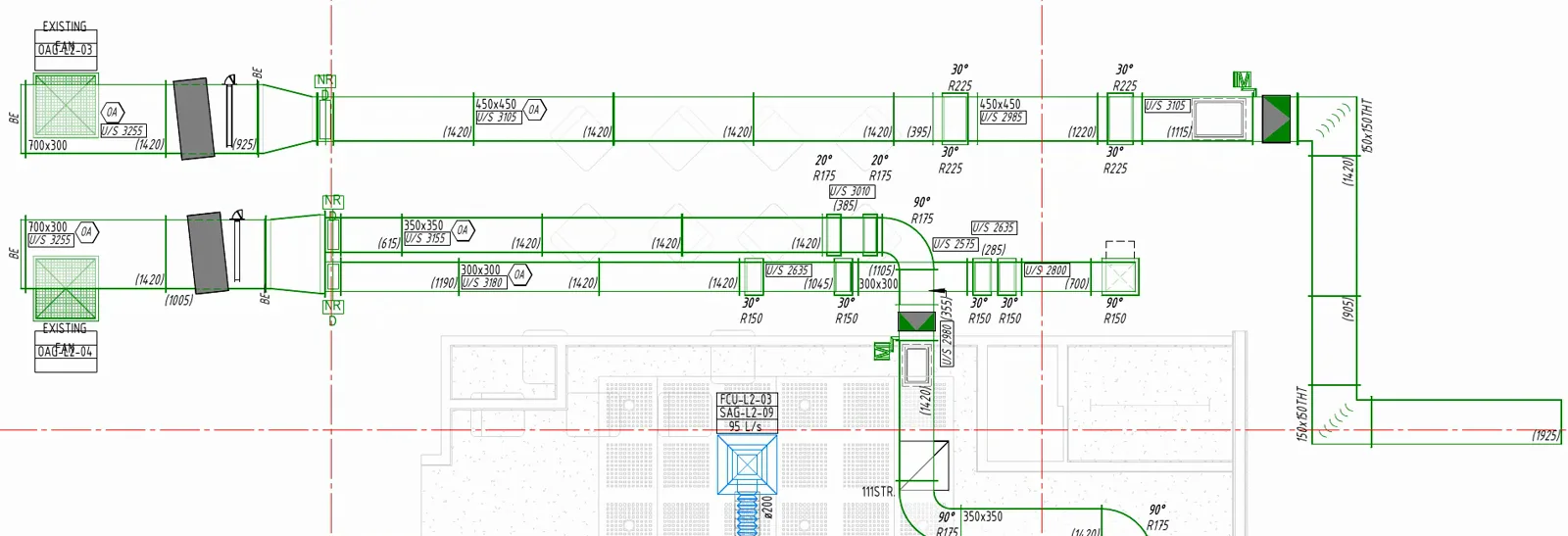
RayCAD is a Revit plugin that places duct tags for you, on every duct in the view you select, in the layout your firm uses. That means size on every run, elevation wherever the duct steps up or down, insulation on the wrapped sections, and a length on the ones fabricators cut to order.
Which ducts
Rectangular ducts, round ducts, oval ducts, and round flex ducts. Native Revit ducts and fabrication ducts are both covered. In section views, rigid ducts are tagged along with fittings, accessories, air terminals, and equipment.
What goes on the tag
For rigid ducts: size, elevation, length, number, system abbreviation, insulation thickness, and lining thickness. For flex ducts: size, length, and system abbreviation. A tag family can show one of these, or several in one tag, and RayCAD handles both. See using your own tag families.
Where a duct size tag goes
A duct carries more kinds of information than any other element, so ducts have the most placement settings.
- Inside the duct. When a tag fits, it goes inside the duct, reading along the run. In the duct-inside layout you pin each content to one of nine spots, such as size at the top left, length at the bottom right, and elevation directly below size. Two layouts ship with RayCAD, and you can import your own.
- Outside the duct. When the duct is too narrow, its tags sit together outside as a group, above or below the duct, on the side with more room. In the duct-outside layout you choose the rows: size, insulation, and system on one line, elevation and length on the next, number last. Two layouts ship, and you can import your own.
- Tag orientation. Choose whether tags outside the duct read horizontally everywhere, prefer horizontal, or follow each placement rule. Save the choice as a named profile.
- Leaders. Choose whether a leader can join the left and right sides of a tag, or all four.
When a duct earns a tag
A duct tag rules profile holds your firm's standard for which events force a tag. For size, elevation, insulation thickness, and lining thickness, you choose what happens at a value change and at a direction change:
- no tag at the event
- a tag on the first duct after it
- a tag on the last duct before it and the first duct after it
Before and after follow the run's order in the view. Elevation has two more switches. One tags sloped ducts. The other tags a duct that crosses the cut plane, which can show more than one elevation. Length, number, and system abbreviation repeat at the spacing you set.
You can also set a minimum duct length, so short stubs do not collect tags.
Duct elevation tags
A missing duct elevation tag is an easy way to earn an RFI. RayCAD reads the elevation from the model and tags it where it begins, where it changes, and on sloped ducts, so a drafter does not scan the sheet for the step in the run. See how this reduces RFIs.
Insulation and lining
Insulation thickness and lining thickness are tagged on the sections that carry them. In section views, RayCAD keeps tags clear of the insulation wrap.
Flex duct tags
A flex duct bends, so its tag follows it. RayCAD places flex duct tags along the flex path, near the air terminal end, and reads the values from the duct.
What next
Fittings and accessories on the same run are covered on the HVAC tagging page. Duct tags that sit clear of the model are described under intelligent placement.
To set up a duct size tag by hand in Revit, see how to set up a duct size tag.
Frequently asked questions
Can RayCAD place duct size tags in Revit automatically?
Yes. RayCAD tags rectangular, round, and oval ducts with size, and it tags where the size begins and again at a readable spacing along long runs.
How does RayCAD handle duct elevation tags?
It tags elevation where it changes, on sloped ducts, and where a duct crosses the view's cut plane. A duct tag rules profile lets you choose whether the tag goes after a change or on both sides of it.
Does it tag flex ducts?
Yes. Round flex ducts get size, length, and system abbreviation tags, placed along the flex path and near the air terminal end.
Can tags sit inside the duct?
Yes. RayCAD puts tags inside a duct when they fit, in the layout your firm uses, and outside, above or below, when they do not.
Does it work on fabrication ducts?
Yes. Fabrication straight ducts are tagged the same way as native ones.