
RayCAD vs Bimrock Autotag: the Bimrock alternative for production MEP tagging
Bimrock Autotag avoids overlaps. RayCAD tags dense production sheets neatly, never places a ? tag, runs on your machine, and costs one flat price for the whole company.



We make RayCAD. Facts about Autotag come from its public pages, listed under Sources.
On this page
RayCAD tags your MEPF production drawings so your drafters review the sheet instead of building it. Bimrock Autotag automates MEP tagging in Revit too. We make RayCAD, and we ran Bimrock on production drawings in September 2026. Here's what we found.
Start the free 15-day trial · See the comparison
A sheet you can issue
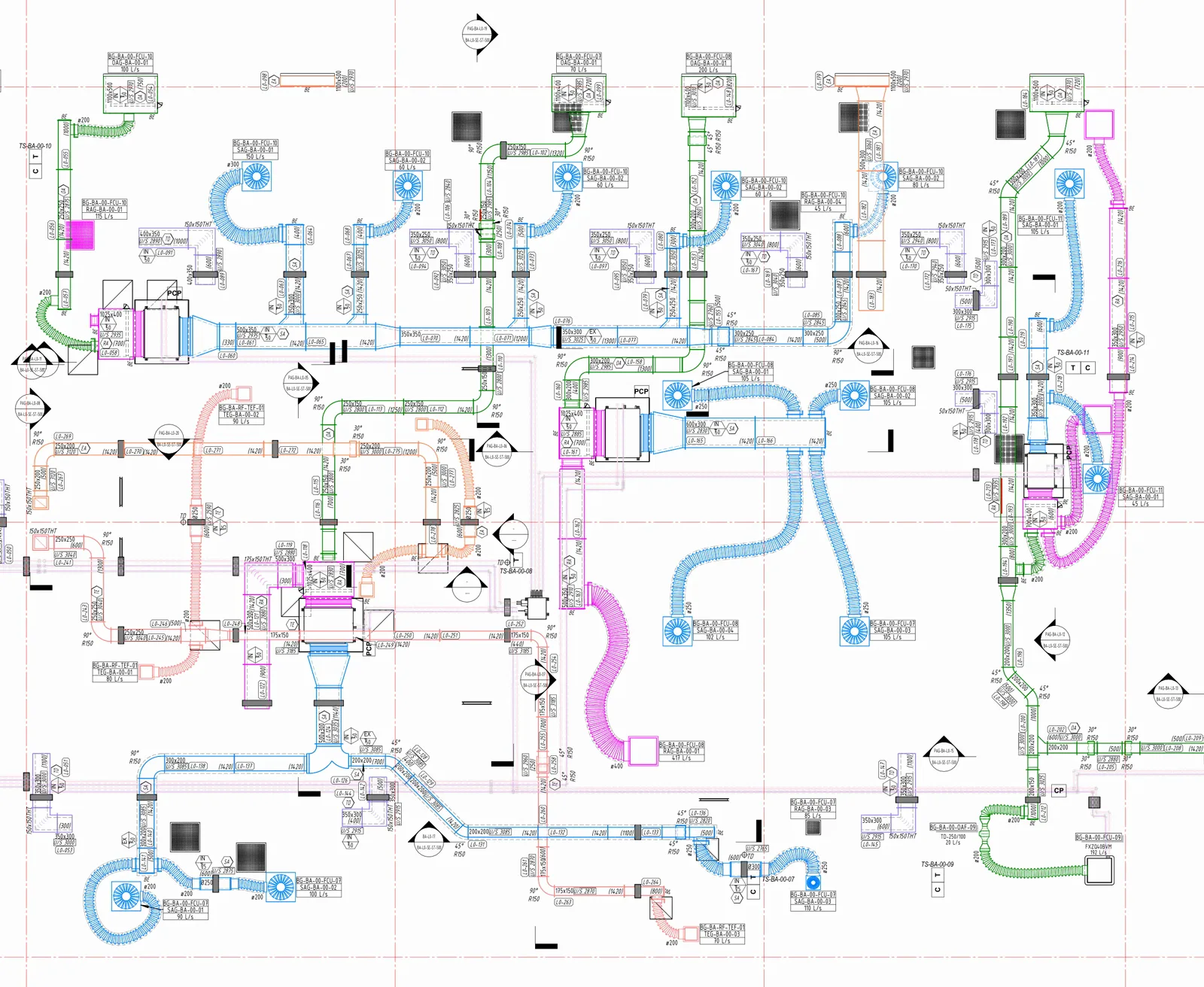
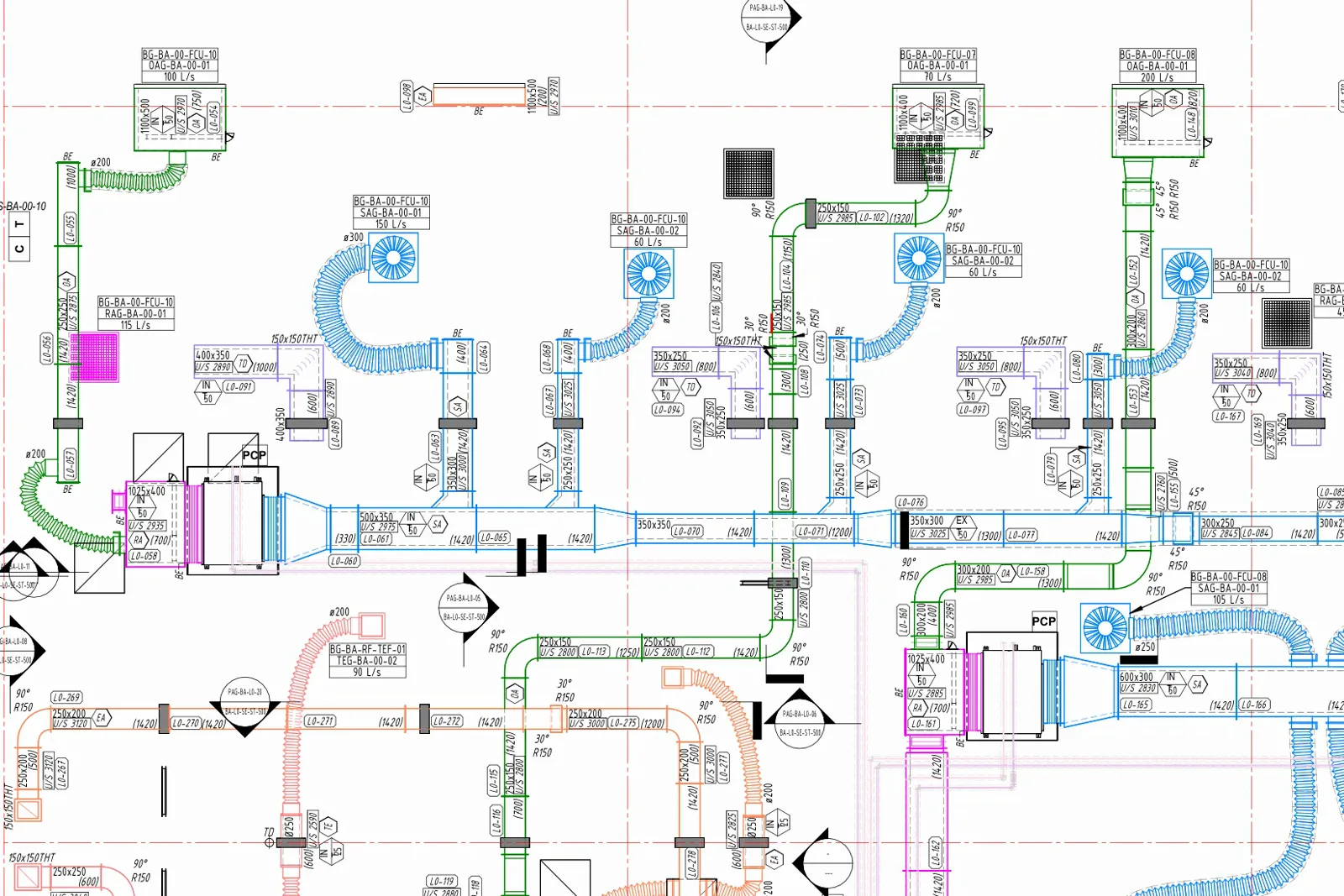
Bimrock sells "overlap-free tag placement". RayCAD avoids overlaps too, and then packs tags the way an experienced drafter would. Each tag sits close to the element it describes, goes inside the element when it fits, and gets a leader only when it needs one. Leaders join the tag square, never cross another tag, and only bend outward.
Every tag on the sheet is valid
An empty tag or a "?" on an issued sheet turns into an RFI. RayCAD checks every tag before it places it. If a tag would come out empty or as "?", RayCAD leaves it off and lists it in the review panel with the reason, so the layout is built from valid tags only.
About 15 times faster
RayCAD tags a section in under 5 seconds, often under one. The biggest floor plans take a minute or two, and 200 tags take about a second. Bimrock took 15 to 20 minutes per view on the same kind of drawing.
What Bimrock Autotag is
Autotag is a Revit plugin from Bimrock AI. It places tags from rule-based profiles that set a position priority, interval tagging, and filters by direction, size, system, type and length. Bimrock's home page now leads with "Automate MEP Design & Engineering", and the company also sells RapidDesign, an MEP modelling tool. Its FAQ says "Annotation is just the start."
RayCAD vs Bimrock Autotag at a glance
| RayCAD | Bimrock Autotag | |
|---|---|---|
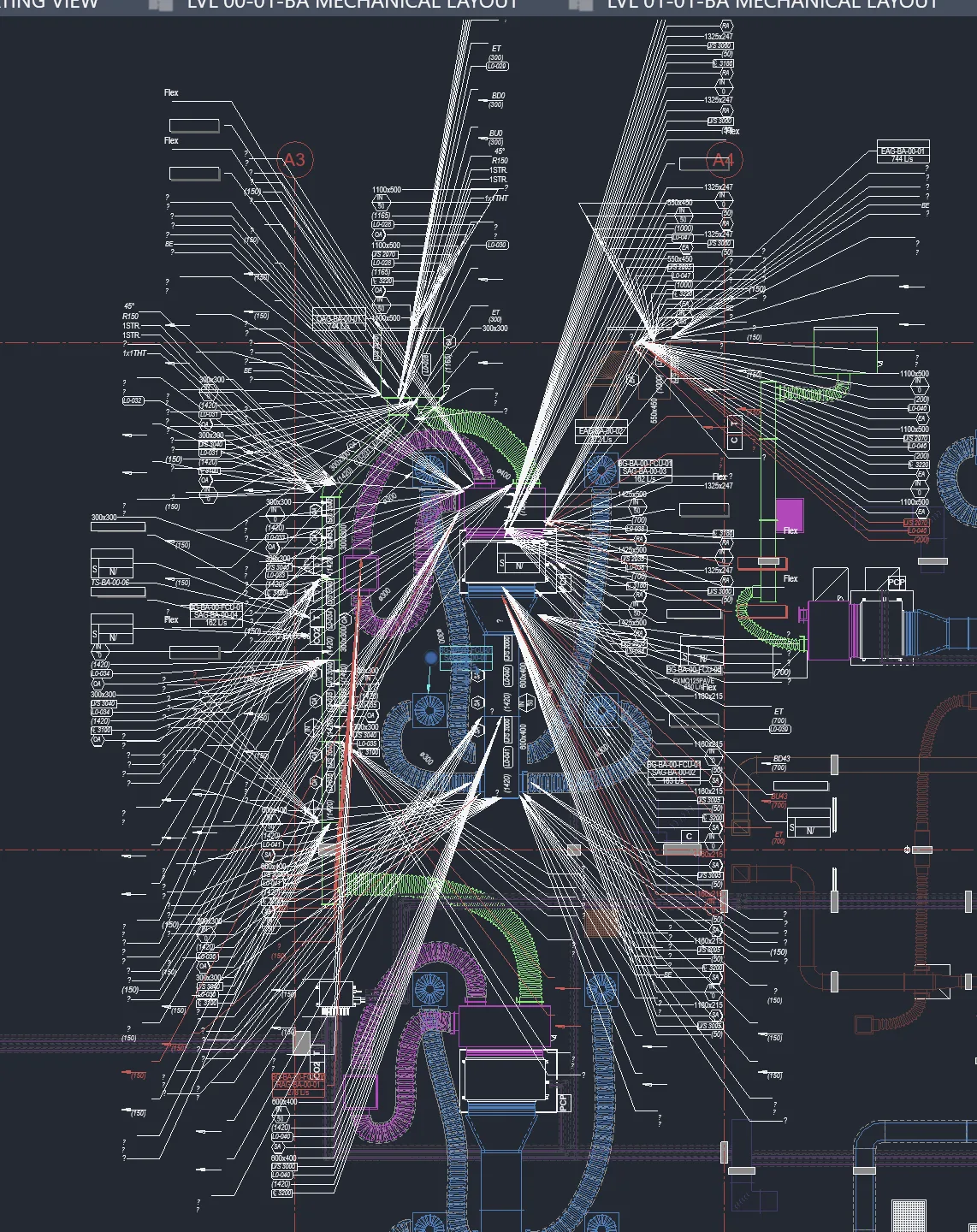
| Neatness on a dense sheet | Packed close to hosts, inside elements when they fit, clean leaders | Hundreds of tags fanned out on long leaders, far from their hosts (September 2026 run) |
| Overlapping tags | None | None |
| Empty or "?" tags | Never placed; listed in the review panel with the reason | Dozens placed on the sheet (September 2026 run) |
| Tags where information changes | Size, elevation and direction changes, plus long runs | A "Change In Dimensions" filter |
| Speed on a production view | Seconds; a minute or two for the biggest plans | 15 to 20 minutes (September 2026 run) |
| Where placement runs | On your machine | Sends placement information to Google Cloud, kept up to 60 days |
| Revit versions | 2021 to 2027 | 2023 to 2027 |
| Price for a team | $200 a month per company, every user licensed | $199 a month for 5 licenses shared by "10-20 designers" |
| Free trial | 15 days on your live sheets, with free onboarding for your whole team, extended if you need longer | Self-serve on the $49 plan: docs, videos and a Discord community |
| Onboarding | Free for the whole team, during the trial and after | Self-serve on the $49 plan, even after you pay |
| Custom changes for your firm | Yes, with the founders on WhatsApp or Teams | Not published |
| Focus | Tagging only, a release every week | "Automate MEP Design & Engineering" |
What we saw on production drawings
In September 2026 we ran Bimrock Autotag on a live HVAC floor plan, the kind of sheet firms issue every week. This is what it produced.
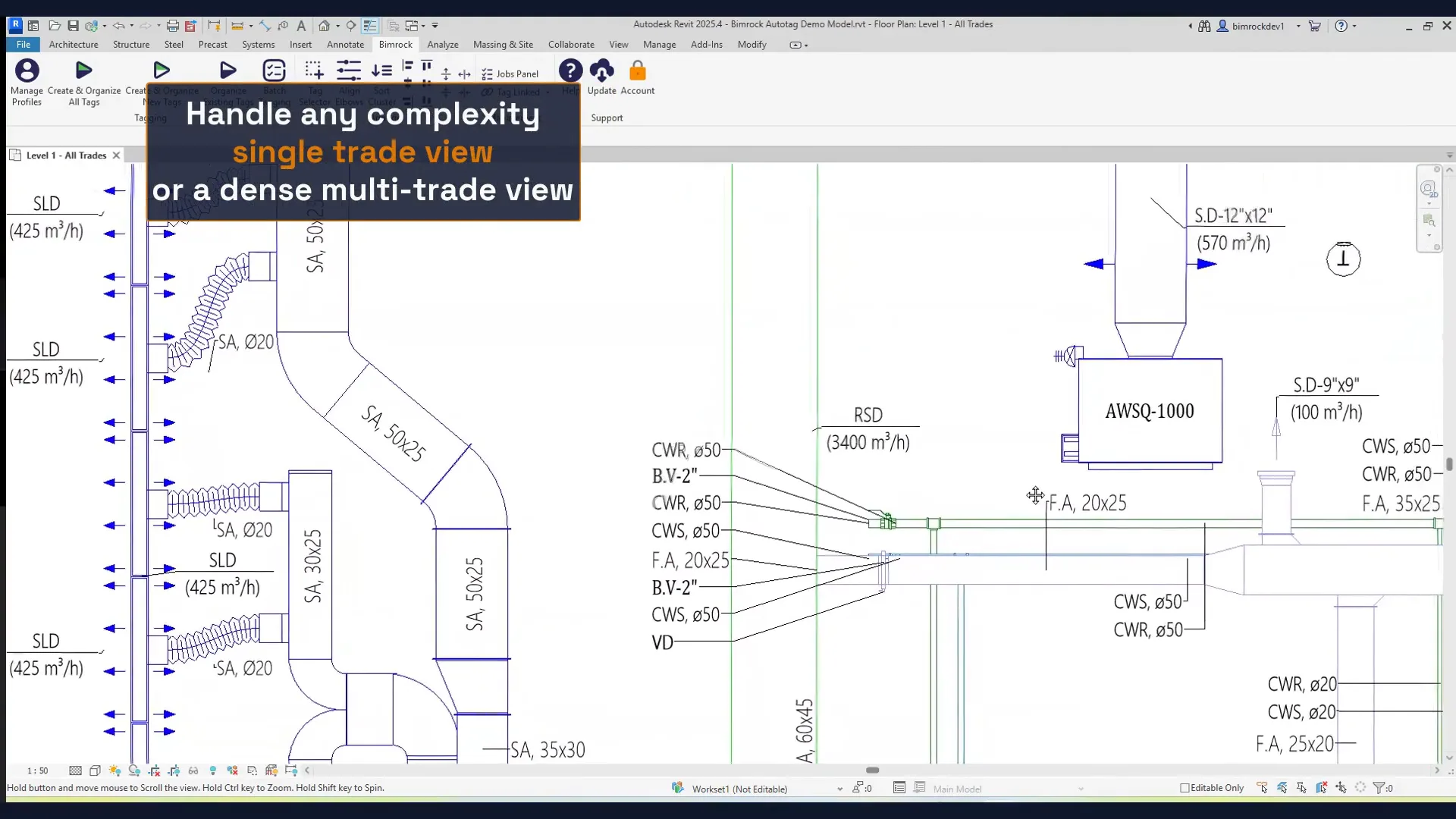
Bimrock's own demos show the same fan on a much smaller view. The one captioned "a dense multi-trade view" is a 1:50 close-up with about 20 tags, with a column of pipe tags whose leaders all meet at one point. Every public demo we found is a sparse view with open space around each tag. Shop drawings don't look like that.
RayCAD is built on dense production sheets, where many elements need 5 or 6 tags. Here is a whole congested HVAC floor tagged by RayCAD, then a closer look at one part of it.
Questions to ask before you choose
What happens when the setup isn't perfect? Nobody configures a tagging tool perfectly on day one. A rough RayCAD config still gives you a usable sheet you can tidy up. The Bimrock run above is what a rough config looks like there.
Where does my data go? Bimrock's Autodesk listing says Autotag sends "stripped-down placement information" to a server on Google Cloud and keeps it for up to 60 days. Bimrock doesn't say what that information contains, so it could include geometry and parameters from your model, and you have no way to check. RayCAD places every tag on your machine. We send usage telemetry only (counts and timings), list it on our security page, and let you switch it off. We sign an NDA. Run Wireshark while RayCAD tags a view and check for yourself.
Will it follow our standard? RayCAD's config panel sets leader attach points, the tag layout inside ducts, orientation per tag, how often to tag, the minimum length to tag, and whether to tag before a change, after it or both. Generate Config reads your project and proposes the mappings. If your firm needs something the options don't cover, we change RayCAD for you.
Who do we call when something's wrong? With RayCAD, the founders. Every customer gets them directly on WhatsApp or Microsoft Teams. On Bimrock's $49 plan, onboarding is "self-serve via docs and videos" and support is a Discord community.
Will it crash Revit? Firms run RayCAD all day on real projects. Every crash a firm hit has been found and patched, so RayCAD almost never crashes now. Read more on stability.
Which trades? RayCAD tags HVAC and piping today, native and fabrication. Electrical and fire sprinklers ship next week. Every release is tested on live projects at several client firms before it goes out, so what ships works on real drawings.
Results
Orbit Engineering Services reports around 70% less tagging time with RayCAD compared with its previous manual workflow. See faster turnaround.
Price, trial and onboarding
RayCAD costs $200 a month for the whole company. Every drafter gets a license and usage is unlimited, so nobody waits for a floating seat. Bimrock's $199 plan buys 5 licenses meant for "10-20 designers".
If you work alone, start on the free trial. If you need only one license after that, talk to us and we'll agree a price for one seat. You get the same RayCAD a 50-person firm gets: neat sheets, valid tags, seconds per view, your data on your machine, and the founders a message away.
Bimrock's $49 plan comes with "self-serve onboarding via docs and videos" and a Discord community, during the trial and after you pay. A trial you run alone mostly tests how well you read the docs. RayCAD's trial lasts 15 days with every feature and unlimited usage, and we spend it with you. We onboard your whole team, set RayCAD up to your standard and run it with you on your live sheets. If you didn't get to use it properly, we extend the trial. We talk price once you've seen what RayCAD saves you. See pricing.
Where RayCAD fits
Tagging is one of the biggest time sinks left in MEP drafting, and solving it takes a team that works on nothing else. Bimrock's home page now sells "Automate MEP Design & Engineering", and it has launched RapidDesign, an MEP modelling tool, while tagging is still unsolved. Firms that build their drafting habits around a tool pay for that drift. RayCAD does tagging only. We've shipped 23 releases in 15 weeks, each with fixes and improvements from customer feedback. Read the changelog.
Try RayCAD for 15 days on your own live sheets. We'll set it up with you, and you can decide once you've seen the savings.
Related
- RayCAD vs BIMLOGIQ Smart Annotation
- RayCAD vs Revit Tag All
- The best Revit tagging plugins
- Intelligent placement
- Data security
How we wrote this
We make RayCAD. The Bimrock facts come from Bimrock's website, its Autodesk App Store listing and its YouTube videos, checked on 9 November 2026 and listed in the sources. The screenshots and timings marked September 2026 come from our own runs of Autotag on production drawings, on the version current then. If something here is out of date, email founder@raycad.in and we'll fix it.
Frequently asked questions
Is RayCAD a good alternative to Bimrock Autotag?
Yes, for firms that issue dense production and shop drawings. RayCAD packs tags neatly close to their hosts, never places an empty or ? tag, tags a view in seconds, and runs entirely on your machine. In our September 2026 runs on production drawings, Bimrock took 15 to 20 minutes per view and placed dozens of ? tags.
Does Bimrock Autotag send data to the cloud?
Yes. Bimrock's Autodesk listing says Autotag sends "stripped-down placement information" to a server on Google Cloud and keeps it for up to 60 days. It doesn't say what that information contains. RayCAD places tags on your machine and sends only usage telemetry, which you can switch off.
Bimrock has a $49 plan. Is it cheaper for one person?
If you work alone, start with RayCAD's free 15-day trial. If you need one license after that, talk to us and we'll agree a price for one seat. You still get neat, valid tags in seconds, everything on your machine, free onboarding and the founders on WhatsApp, none of which comes with a self-serve plan.
What does RayCAD cost for a team?
$200 a month for the whole company. Every drafter gets a license, and usage is unlimited. Bimrock's $199 plan gives 5 licenses for "10-20 designers".
Which Revit versions does RayCAD support?
Revit 2021 to 2027. Bimrock lists 2023 to 2027.
Which trades does RayCAD tag?
HVAC and piping today, both native elements and fabrication parts. Electrical and fire sprinklers ship next week, after testing on live projects at client firms.
Can I try RayCAD before paying?
Yes. The trial lasts 15 days, with every feature, unlimited usage and no credit card. We onboard your team during the trial, and we extend it if you didn't get to use it properly.
Sources
- Bimrock home page, pricing and FAQ (checked November 9, 2026)
- Autotag on the Autodesk App Store, including its data and privacy section (checked November 9, 2026)
- Bimrock Autotag demo video (YouTube) (checked November 9, 2026)
- Bimrock "A whole floor, tagged" video (YouTube) (checked November 9, 2026)
- Bimrock RapidDesign (checked November 9, 2026)
- RayCAD pricing (checked November 9, 2026)