
Tagging software that follows your firm's Revit standard
RayCAD places MEPF tags to your firm-specific placement standard, from tag position and leader rules to which corner each tag sits in. Your drawings look the same as the ones you ship today.



On this page
Firms tag differently. Some put tags inside ducts and some put them outside. Some want a tag above a duct when there is space and below it when there is not, so the sheet stays consistent and neat. Some allow leaders at 90 degrees only, attached to the host at a perpendicular angle, and others allow different angles. One firm might want the insulation tag in one corner of a duct, the length tag in another, and size and elevation together.
RayCAD supports all of this. It follows your firm-specific placement standard, so you do not have to change how your firm tags to use it.
Your placement standard, configured in RayCAD
You set up where each kind of tag goes relative to its element, the order RayCAD tries positions in, how tags on the same element are arranged, how far they sit from each other and from the model, and how leaders are drawn and where they attach. You can set this separately for each type of element, and you can keep a different setup for each project in its own preset. See using your own tag families.
The configuration covers the details drafters care about, so a standard that exists in your firm's drafting guide can exist in RayCAD.
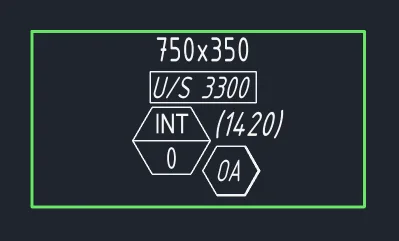
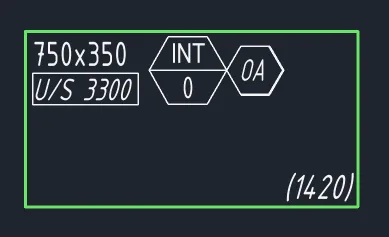
See it on the home page under Your standard.
Custom profiles for your firm
If your firm has a requirement that the settings do not cover, we build it. We create the exact custom profile your company needs. As soon as we get in touch and understand how your firm's standards work, we put them into the software, and you can use them. We turn these around quickly.
You do not compromise on your standard
There is no compromise with RayCAD, unlike other plugins that only allow limited configuration. After using RayCAD you do not have to give up any part of your standard. Your drawings look the way they did before, at the same quality or better, and they are faster and cheaper to produce. RayCAD does not change your existing placement standards or the deliverables you hand to clients. We take care of your firm's standards.
Read how RayCAD places tags intelligently within your standard.
To write and roll out a tagging standard in Revit, see how to set up a firm tagging standard.
Frequently asked questions
Can RayCAD follow my firm's Revit tagging standard?
Yes. RayCAD places tags to your company's annotation standard, including where tags sit relative to the element, how leaders behave, and how several tags on one element are arranged.
Can I choose whether tags go inside or outside ducts?
Yes. Some firms tag inside ducts and some tag outside. RayCAD supports both, and it can prefer a position such as above a duct and fall back to below when there is no space.
Can I control leader angles?
Yes. Some firms allow only 90-degree leaders that attach to the host at a perpendicular angle, and other firms allow different angles. Both are supported.
What if my standard needs something RayCAD does not offer yet?
Contact us. We build the custom profile your firm needs and add it to RayCAD, usually within a short time of understanding your standard.
Will my drawings look different after switching to RayCAD?
No. RayCAD follows your placement standard, so drawings look like they did before, at the same or better quality, made faster and at lower cost.