
RayCAD vs Revit Tag All: an alternative to Tag All Not Tagged for MEP sheets
Revit's Tag All Not Tagged puts a tag on every element at the same spot and leaves you to clean up the overlaps. RayCAD tags MEP production sheets neatly, only where the information changes.



We make RayCAD. Facts about Tag All Not Tagged come from its public pages, listed under Sources.
On this page
RayCAD tags your MEPF production drawings so your drafters review the sheet instead of building it. Tag All Not Tagged is the tagging command built into Revit. We make RayCAD.
Start the free 15-day trial · See the comparison
You stop cleaning up after Tag All
Every drafter knows the routine: run Tag All, then spend the afternoon dragging tags off ducts and off each other. RayCAD places every tag where a drafter would put it, so the cleanup never starts.
Tags only where they carry information
Tag All tags every segment of a run, so a duct split by fittings gets the same size five times. RayCAD tags where the size, elevation or direction changes, and where a long run needs a tag to stay readable.
No empty or "?" tags
A tag whose parameter is blank shows up as "?" or as an empty box, and Tag All places it anyway. RayCAD checks every tag first and lists the bad ones in its review panel with the reason, so they never reach the sheet.
What Tag All is
Tag All Not Tagged is a command on Revit's Annotate tab. You pick the categories and the tag families, choose whether to add leaders and the orientation, and Revit tags every untagged element of those categories in the active view or in your selection. Each tag goes at the element's default position. It ships with Revit at no extra cost.
RayCAD vs Revit Tag All at a glance
| RayCAD | Revit Tag All | |
|---|---|---|
| Where tags go | Close to the host, inside it when it fits, packed like a drafter would | The same default spot on every element |
| Overlapping tags | None | Common on any busy view |
| Which elements get a tag | Where size, elevation or direction changes, plus long runs | Every untagged element of the chosen categories |
| Leaders | Only when needed; square joins, no crossings | All on or all off |
| Empty or "?" tags | Never placed; listed with the reason | Placed |
| Review after the run | Review panel lists every tag that needs a look | You inspect the whole sheet |
| Tag families | Yours | Yours |
| Price | $200 a month per company | Included with Revit |
| Free trial | 15 days on your live sheets, with free onboarding for your whole team, extended if you need longer | No setup help; the cleanup is on you |
What a tagged sheet looks like
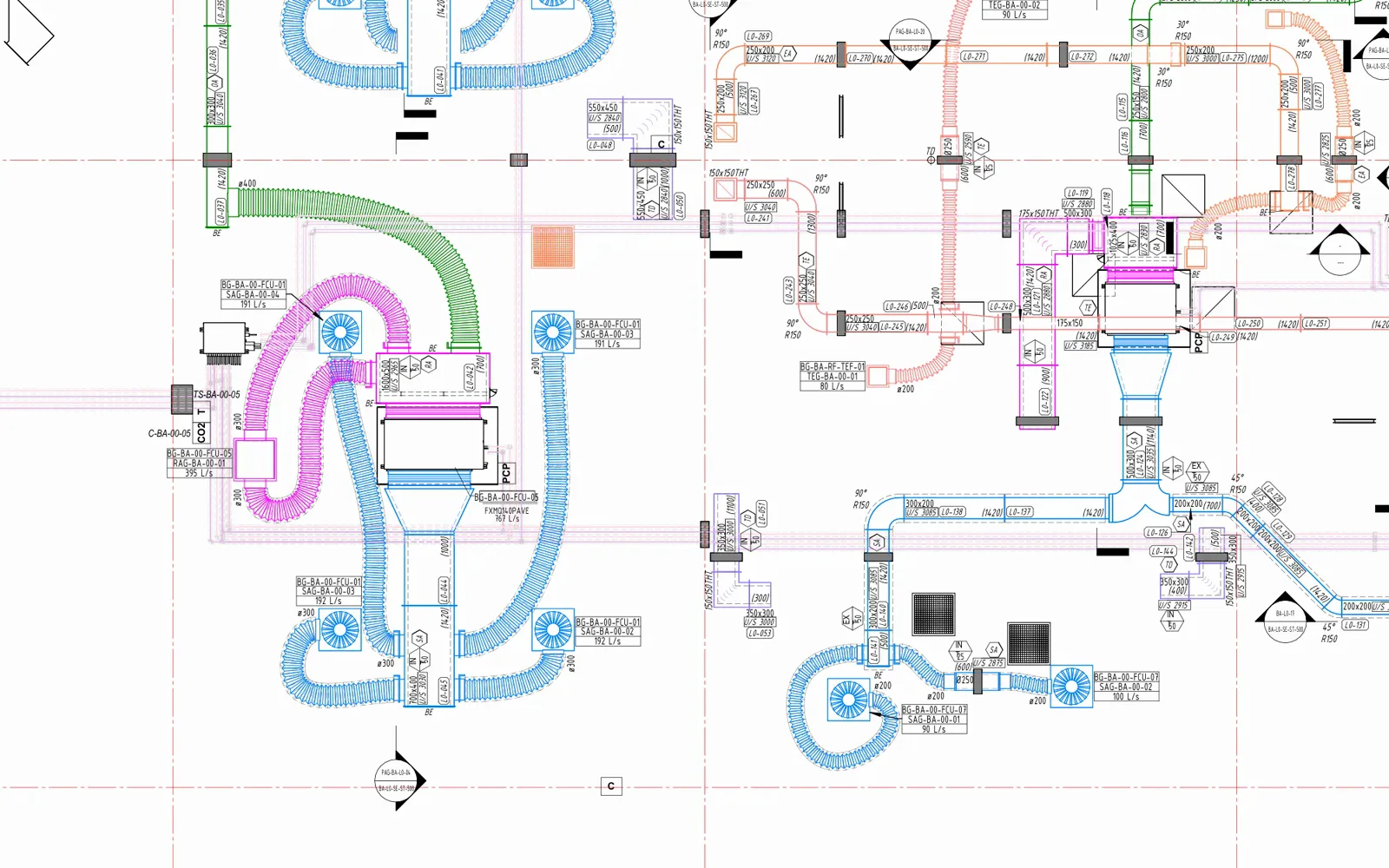
Here is part of a congested HVAC sheet tagged by RayCAD. Every tag sits by its duct, nothing overlaps, and nothing needs dragging.
Questions to ask before you choose
Can't I fix Tag All with a Dynamo script? You can try. Placement and overlap logic is the hard part, and it breaks on the next view you didn't write it for. We wrote up the real cost in build vs buy.
What about plugins that align tags after Tag All? Alignment tools tidy tags you've already placed. You still run Tag All, still delete the repeats, and still drag each tag off the duct before you align it.
Will it follow our standard? In RayCAD you set where leaders attach, how tags sit inside a duct, which way each tag faces, how often and from what length a run gets a tag, and whether tags go before a change, after it, or on both sides. Generate Config reads your project and proposes the mappings. If your firm needs something the options don't cover, we change RayCAD for you.
Does my drawing leave the office? No. Every tag is worked out and placed on your own computer. The only thing RayCAD sends is usage telemetry, which you can turn off, and the security page lists exactly what it is.
How fast is it? A section takes under 5 seconds, often under one. The biggest floor plans take a minute or two.
Which trades? HVAC and piping today, native and fabrication. Electrical and fire sprinklers ship next week, after testing on live projects at client firms.
Results
Against its old manual workflow, Orbit Engineering Services reports around 70% less tagging time with RayCAD. See faster turnaround.
Price, trial and onboarding
Tag All costs nothing extra. The cleanup after it costs drafter hours on every sheet. RayCAD costs $200 a month for the whole company, with a license for every drafter and unlimited usage. See pricing.
The trial lasts 15 days with every feature. We onboard your whole team during the trial, set RayCAD up to your standard, and run it with you on your live sheets. If you didn't get to use it properly, we extend the trial. We talk price once you've seen what RayCAD saves you.
Where RayCAD fits
Whatever you're tagging, a sparse plan or a packed shop drawing, RayCAD does the whole job and your drafters review the result. Every tag lands neat and valid, and every element that needs a tag gets one. Try it for 15 days on your own live sheets.
Related
- Revit Tag All not working
- Revit tags overlapping
- Tag All in multiple views
- RayCAD vs Bimrock Autotag
- RayCAD vs BIMLOGIQ Smart Annotation
- The best Revit tagging plugins
How we wrote this
We make RayCAD. The Tag All facts come from Autodesk's help and support pages, checked on 9 November 2026 and listed in the sources. If something here is out of date, email founder@raycad.in and we'll fix it.
Frequently asked questions
What's a better alternative to Revit Tag All for MEP drawings?
RayCAD. Tag All puts one tag on every element in the view at the same default spot, with no overlap handling. RayCAD tags only where the information changes, packs tags neatly close to their hosts with no overlaps, and never places an empty or ? tag.
Why do Tag All tags overlap?
Tag All places each tag at the element's default position. It doesn't look at the tags or elements around it, so on a busy MEP view tags land on top of each other, on ducts and on other tags.
Does Tag All tag every duct segment?
Yes. It tags every untagged element of the categories you pick, so a run cut by fittings gets the same tag on every segment. RayCAD tags where the size, elevation or direction changes and where a long run needs a tag to stay readable.
Is RayCAD free like Tag All?
RayCAD costs $200 a month for the whole company, with a license for every user. The 15-day trial is free with every feature. Most firms spend far more than that in drafter hours cleaning up after Tag All.
Which Revit versions does RayCAD support?
Revit 2021 to 2027.
Can I try RayCAD before paying?
Yes. The trial lasts 15 days, with every feature, unlimited usage and no credit card. We onboard your team during the trial.
Sources
- Autodesk Help, Tag All Not Tagged (checked November 9, 2026)
- Autodesk Support, Elements are not tagged when using Tag All (checked November 9, 2026)
- RayCAD pricing (checked November 9, 2026)